Why ResortPass Chose a Native iOS App
Jerome Campbell · Software Engineer ·
Today, ResortPass uses a cross-platform codebase, written with Flutter, for the ResortPass app on iOS and Android. That was a good call to start out; it let a small team focus on one codebase while still shipping to two platforms.
However, this year we decided to rebuild the iOS app natively, in Swift and SwiftUI. It was a significant decision. We are investing in a mobile experience that makes finding and booking a pool day, cabana, or spa visit feel effortless. What follows is what we weighed, why native won, what we're giving up, and how we're going about it.
Where We Started
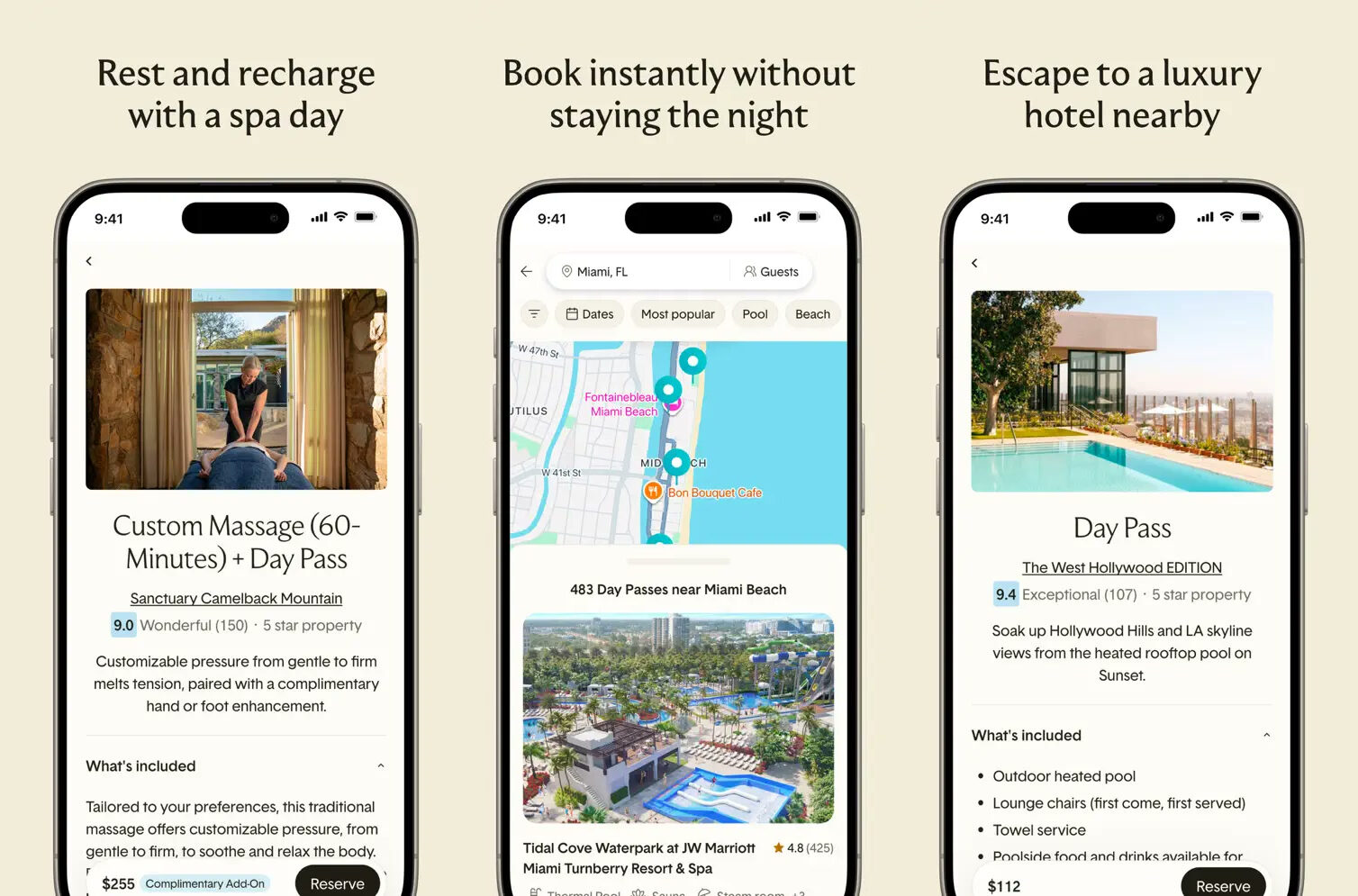
ResortPass lets people book a day at a hotel's pools, cabanas, spas, and other amenities without staying the night. Guests get a resort day close to home, and partners earn new revenue from their amenities. Our iOS and Android apps are used by millions of guests and are growing. They are also highly rated, with 4.9 stars on both app stores. Behind the apps is a Flutter codebase of about 165,000 lines spread over 1,401 files, with 46 distinct features and 16 outside services. Those reviews set a high bar for the rebuild: guests should keep the experience they trust as we improve it.
The Advantages of Native
The Best Experience
Above all, we are going native because we want ResortPass to be the fastest, most intuitive app we can build for our guests. For many of them, the app is the main way they find, book, and use a pass, so how it feels shapes how they see ResortPass. Flutter has served us well. Building specifically for iOS gives us more direct control over the interactions that make discovering and booking an experience feel natural.
A native app can use the same interface components as the rest of iOS, so screens, gestures, and controls follow familiar conventions. Swiping back to the previous screen, selecting and editing text, and accessibility interactions can use the platform's own behavior. Flutter recreates many of these behaviors, while native components give us the system's implementation directly. Our custom screens still need careful design and testing, including with VoiceOver and larger text.
Flutter is fast, and for most of what our app does, it's fast enough. It ships its own rendering engine, but that difference alone doesn't tell us how much faster a native ResortPass app will be. We will compare release builds on the same devices and network conditions, looking at startup time, scrolling responsiveness, and session stability. The performance case needs to come from what guests experience in our app.
Platform Support
A platform's native frameworks and APIs are written by the same people who write the operating system. Working directly with them gives us access to new platform capabilities and first-party tooling as they arrive. With a cross-platform app, we also need to consider support in the framework and plugins we use.
One example is the recent announcement of the iPhone Duo, Apple's new foldable. Its outer display is short and wide, a new aspect ratio for Apple devices, and iOS 27 reorganizes itself around that shape. With six weeks from the iPhone Duo's announcement to its release, we developers have our work cut out for us.
For an app built from the system's own components, the OS provides a useful starting point for adapting the interface. Our layouts still need to be tested in the new form factor. When we ran the ResortPass Flutter app on the iPhone Duo simulator, it was pretty rough in some places. Updating those screens to support the iPhone Duo will be a significant undertaking.
The bigger issue is that this isn't a one-time problem. Just last year, Apple's Liquid Glass system redesign presented similar challenges, and we're sure there will be more to come in future years. For us, staying close to the system gives us a more direct way to keep up with these changes, and that's a reason to build natively.
Vendor Support
Vendors typically build SDKs for iOS and Android first. Flutter support, when it exists, often comes later, has fewer features, or is left to a community plugin. Some vendors we've worked with didn't offer a Flutter SDK at all.
To fill those gaps, it's possible to mix Dart and Flutter with native Swift or Kotlin code. Each integration adds a boundary to implement, debug, and maintain. For the iOS app, using a vendor's native SDK directly lets us work with its platform implementation and tooling.
Hiring
Recruiting experienced Flutter engineers is not easy. For a small team trying to scale, that's a real concern. To be fair, native iOS development is also a specialized skill. However, the relative maturity of native development with Swift compared to Flutter, as well as its widespread use within iOS development, makes it the right choice for the long-term growth of our team.
For engineers, the opportunity is to help define the native app's foundations and shape how a growing consumer product feels in people's hands. In a small team, decisions about state, navigation, performance, and accessibility have a direct effect on the experience guests use.
Drawbacks
Two Codebases
The most obvious cost is duplication. Moving to a native iOS app means in the future, a feature or bug fix touching both platforms will be built twice, once in Swift and once in Dart.
We expect coding agents to reduce some of that duplicated implementation work, especially when they have an existing feature to use as a reference. Much of the product definition can still be shared between the apps. Testing, integration, debugging, and releases remain separate responsibilities, so we will need to evaluate the savings across development and maintenance.
Two Apps That Drift Apart
By moving to native iOS, we'll be giving up the consistency of our iOS and Android apps looking and behaving alike by default. The more we adopt system components, the more the UI will start to differ between platforms. This isn't just an engineering concern; designers will need to think about two variants of a screen, and support articles and marketing screenshots will have to cover two experiences instead of one.
We plan to keep functionality the same, while allowing each app to follow its platform's navigation and interaction conventions. Those differences can affect behavior as well as appearance, so they need product and accessibility testing. Ultimately, we're willing to give up identical presentation to gain platform support and a native feel.
A Slower Development Loop
Moving away from Flutter means we lose hot reloading, which allows developers to see changes they make reflected in the app without rebuilding. To make the loss more palatable, we're doing a few things to make sure builds aren't an impediment to development. For one, we're using an architecture based on small modules to keep incremental builds manageable. We're also leaning on SwiftUI previews to enable a quick feedback loop for changes within a single view. These should minimize the impact of losing hot reloading.
What About Android?
For now, the Android app will stay on Flutter. We started with iOS because that's where most of our guests are. Rebuilding that platform first means the benefits reach the majority of our users as quickly as possible. The iOS migration will tell us a lot about the difficulty and complexity of whole-app migrations with AI assistance. Once we finish, we'll be better equipped to decide whether to build a native Android app as well.
How We're Doing It
Experiment in a Playground First
Before starting the real app, we built a native iOS app in a sandbox we call the playground. It was a place to try different architecture and setup approaches against small slices of the ResortPass app and find out which ones held up.
A lot got worked out there. We tried out splitting the app into small modules and managing the dependencies between them. We settled how a view's state should be represented, a shape we'll use in every feature. Our strategies for managing navigation, localization, and analytics were formed through experimentation in the playground.
Working in the playground has taught us a lot, but we won't be porting its code directly into the app. Since we knew the code wouldn't be used in production, we could be quick and dirty with our exploration. As we create the real app, we can build to a higher level of quality, informed by our learnings from the playground.
Rebuild 1:1
Starting a rebuild is exciting, and we have big hopes for what the app can become. Hence, we're constantly tempted to tack more changes onto the rebuild. To prevent scope bloat, we decided to limit the rebuild to a 1:1 recreation of the Flutter app's functionality, with almost no changes. This allows us to use the Flutter implementation as a reference, minimizing product questions that would slow development.
That means when users open the native app for the first time, they may not notice many changes. Some UI components will fit in better with iOS, and performance may improve, but the basic appearance and functionality of the app will be the same. Our first release needs to preserve what guests trust and give us a foundation for improving the experience. Many of the benefits of building natively will come later as we refine the UI, build new features, and keep up with OS changes.
Preserving that trust includes keeping guests signed in and their existing reservations accessible. Booking and payment flows, notifications, deep links, and analytics all need to behave correctly. Before expanding the release, we need to verify those journeys and compare startup time, crash-free sessions, and booking completion with the existing app. A gradual rollout and a recovery plan are part of that work.
The 1:1 rule has a few exceptions. Some features have been recently rebuilt on the web, and the changes haven't made it to mobile yet. It wouldn't make sense to make a native implementation for the old version of these features if we're planning on redoing them soon. In these cases, the new features will be built to match the web rather than the Flutter app. We'll still have the web implementation to refer to, so the rebuilding process should stay smooth.
Keeping Agents in Line
We'll be using agents to write most of the code for the new app. In our experience, this works especially well in cases like this where they can imitate a proven reference implementation. Before building a feature, they'll walk through it in the Flutter app, capturing logic and transcribing copy word for word. They'll then use that information to create the native version of the feature.
For quick, deterministic checks on the agents' work, we created scripts that run automatically whenever an agent finishes a task. Scripts enforce the boundaries between modules and between the layers inside each feature, keep networking code in one place, and make sure all on-screen text can be translated. Any failure prompts the agent to try again. These scripts, along with our linter and unit tests, help ensure that generated code meets our quality standards.
Then other agents will review the work. One is a code reviewer that checks module boundaries, concurrency, dependency injection, localization, and test quality. Another compares the built screens against Figma, our design tokens, and the Flutter app's behavior. An engineer will own the architectural decisions, guide the process, and verify the result in the running app. Another engineer will review every change before it's committed. Engineers remain accountable for the code and the guest experience it delivers.
We want this foundation to help us keep improving how guests discover and book experiences. If you enjoy building consumer products with that level of detail and ownership, explore our open engineering roles.
For your next day away, explore ResortPass experiences or download our current app on iOS or Android to find a pool, cabana, or spa worth spending the day at.